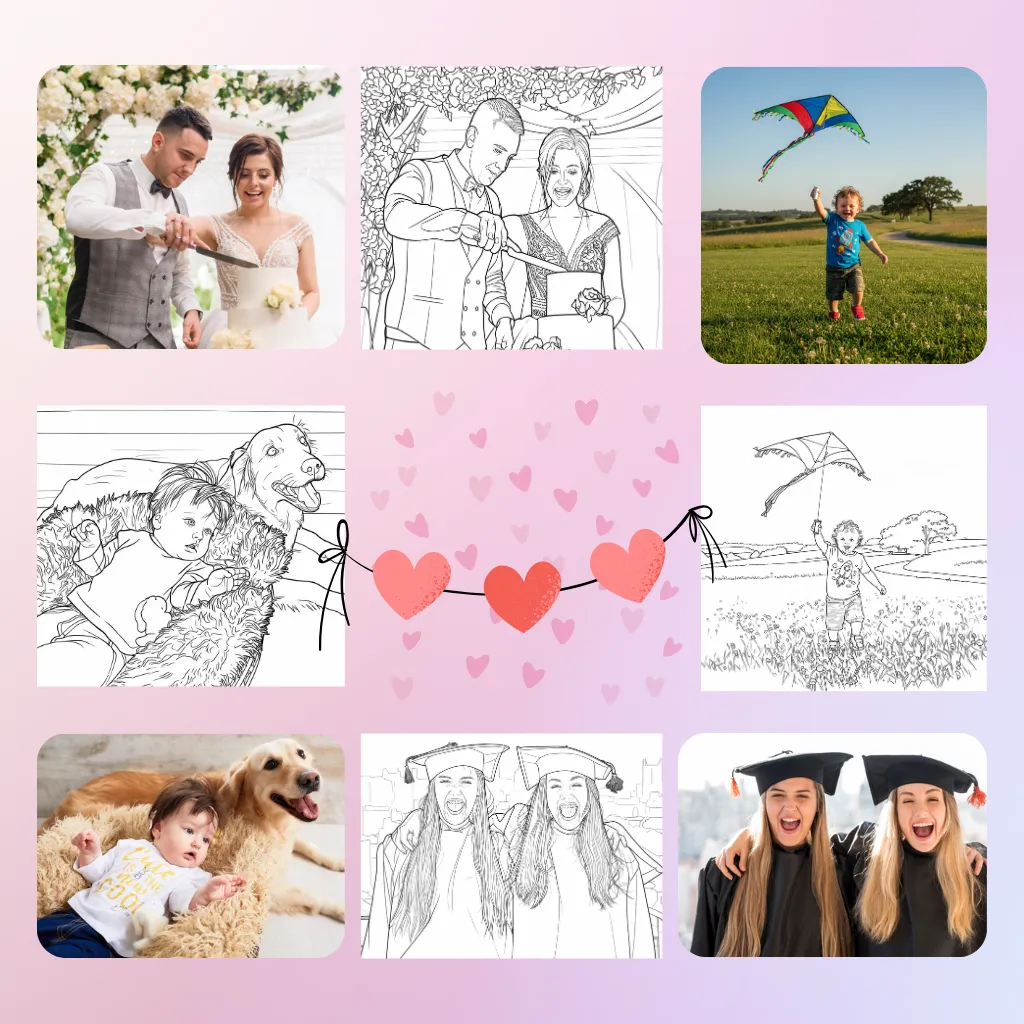
Your most cherished photos — your child's first steps, a wedding portrait, the family pet's goofy grin — can become something even more special: personalized coloring pages. With AI photo-to-coloring technology, you can transform any photo into clean, printable line art in seconds. This guide covers everything you need to know, from choosing the right photo to creative ideas for your finished pages.
How Photo to Coloring Works
The technology behind ColorByte AI's Photo to Coloring Page converter is remarkably sophisticated yet simple to use. Here's what happens when you upload a photo:
- Edge detection — The AI analyzes your photo and identifies every contour, edge, and boundary between different objects and regions.
- Line extraction — It traces clean black outlines around all detected edges, converting the photographic image into line art.
- Background simplification — Busy backgrounds are simplified or removed, keeping the focus on the main subject.
- Style application — You can choose from multiple line art modes: Standard (balanced detail), Simple (bold outlines for kids), Detailed (fine lines for advanced coloring), and Sketch (hand-drawn artistic feel).
The entire process takes about 3 seconds. What would take an artist an hour to trace by hand, the AI does in the blink of an eye.
What Makes a Good Photo for Coloring Page Conversion
Not all photos convert equally well. Here's what to look for when choosing a photo:
- Good lighting — Well-lit photos with clear contrast between the subject and background produce the best results. Avoid dark, underexposed images where details blend together.
- Clear subject — A single, prominent subject with clean edges converts beautifully. Portraits, pets, and object photos are ideal.
- Moderate background — Simple backgrounds work better than cluttered ones. A person standing against a plain wall will convert more cleanly than someone in a crowded room.
- High resolution — Use the original, high-quality version of your photo. The more detail in the image, the more the AI has to work with. Avoid heavily compressed or small images.
- Good contrast — The subject should stand out from the background. A person in a white shirt against a white wall will produce faint, hard-to-color outlines.
Step-by-Step: Convert Your First Photo
- Visit the Photo to Coloring Page tool on ColorByte AI.
- Upload your photo — Click or drag-and-drop. JPG, PNG, and WebP formats are all supported, up to 10MB.
- Choose your line art mode:
- Standard — Balanced, clean outlines suitable for all ages.
- Simple — Extra-thick bold outlines with simplified shapes. Perfect for young children.
- Detailed — Fine, precise lines that preserve textures and small details. Best for adult coloring enthusiasts.
- Sketch — Organic, hand-drawn feel with natural line variation. Great for artistic projects.
- Select your ratio and resolution — 1:1 for square prints, 3:4 for standard portrait, or any of the other available formats. Choose up to 4K resolution for the sharpest output.
- Click "Convert" — The AI generates your coloring page in seconds.
- Download as PNG or PDF — Use PNG for single pages or PDF for multi-page collections.
Creative Ideas for Photo Coloring Pages
Personalized Family Coloring Books
Convert 10–20 family photos into coloring pages, bind them together, and you have a one-of-a-kind family coloring book. Include photos from vacations, holidays, and everyday moments. This makes an incredibly meaningful gift for grandparents — they get to color scenes of their grandchildren's lives.
Wedding and Engagement Gifts
Take the couple's engagement photo or a favorite wedding shot and turn it into a coloring page. Frame the converted line art alongside the original photo for a beautiful "before and after" display. Better yet, create a set of pages from their relationship milestones as a unique wedding shower gift.
Pet Portraits
Our pets are family too. Convert your best pet photos into coloring pages. Create a "Color Your Pet" book featuring different poses and expressions. These make wonderful memorial tributes for pets who have passed, or fun gifts for fellow pet lovers.
Baby's First Year Collection
Document each month of your baby's first year by converting a monthly milestone photo into a coloring page. By their first birthday, you'll have 12 beautiful line art pages that tell the story of their growth. Color them in soft pastels and frame the collection.
Classroom and Educational Use
Teachers can convert photos of students (with permission), classroom pets, or school landmarks into coloring pages. These personalized pages make students feel special and engaged. Use them for "All About Me" projects, year-end memory books, or class auction items.
Custom Greeting Cards
Convert a family photo to line art, print it on cardstock, fold in half, and you have a greeting card more personal than anything you'll find at the store. Add a hand-colored touch for extra warmth.
Tips for Best Results
- Start with the best possible photo — A crisp, well-lit 2K or higher resolution photo will always produce better line art than a grainy, dark image.
- Experiment with line modes — The same photo can look completely different in Simple vs. Detailed mode. Try all four to see which fits your intended use.
- Use the right resolution for your project — For printing, 2K is great for standard letter-size pages. For large-format prints or professional publishing, use 4K.
- Combine with our text-to-coloring tool — For the best of both worlds, use text-to-coloring to generate background elements (trees, flowers, borders) and combine them with your photo conversion.
- Don't expect perfection — AI photo-to-coloring produces beautiful, stylized line art. It won't be a pixel-perfect tracing of your photo — and that's part of the charm. The artistic interpretation is what makes each page special.
Ready to turn your favorite memories into coloring pages? Try the Photo to Coloring Page tool now — free to start.